AI video generator: a TikTok UGC ad from a photo of your product
Choose a photo of a product from your store: Vueko writes the script, creates a person who presents the product to camera, then edits a vertical video with voice-over, subtitles and music. You see every choice before you pay. AI creatives are included in the Growth and Pro plans.
Free account, no credit card needed.
From photo to video, in five steps
You choose the product and the length
The video starts from a store generated in your workspace and takes its name, logo, colors and language. Pick a photo from the store or upload your own, showing the product on its own. Choose 15 or 30 seconds, then “Analyze my photo”: it is free.
You choose a scenario and the person
Vueko suggests scenarios that fit your product, such as a cream being applied or a piece of jewelry put on then worn, or follows your own idea. You pick the person from three lists: woman or man, age, style. Vueko prepares the starting image for free, and you see it before you pay.
You choose the hook and review the script
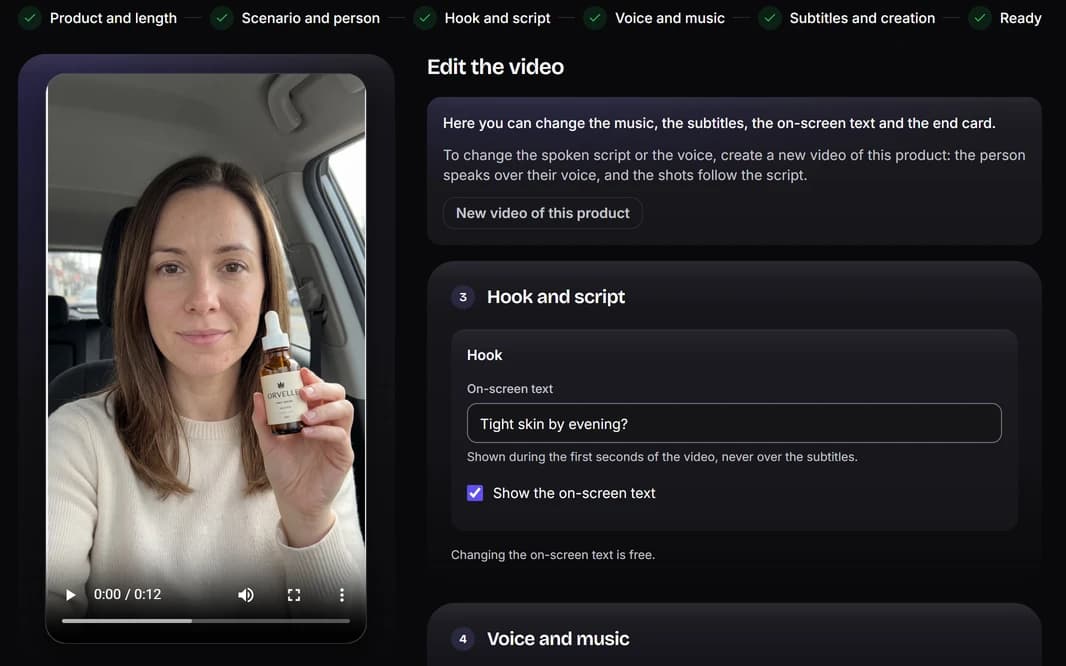
Several hooks are suggested, or you write your own: the person says it to camera at the start of the video. You can review and edit the voice-over script, and Vueko tells you if it is too short or too long for the length you chose.
You listen to the voice and choose the music
The voice follows the person you chose, and you can listen to it before creating. The background music is generated for the video, with no lyrics, in one of the 6 styles on offer, or left out.
You set the subtitles and create the video
Subtitles appear word by word, where you prefer on screen; the end card shows the brand's logo and name. “Create the video” starts the work, and credits are only deducted once the video is ready.
What the video contains
The video lasts as long as its voice, then its end card: 15 seconds at most, or 30. It opens on a face-to-camera shot, where the person says the hook, then moves on to product-in-use shots, where they use the product. The file is a vertical MP4, in TikTok's format.
- Shots
- Face to camera3 to 5 sProduct in use4 to 6 sProduct in use4 to 6 s
- On screen
- HookEnd card
- Voice
- The person, then the voice-over
- Subtitles
- Word by word
- Music
- The music you chose
A UGC ad, with no filming
A UGC ad looks like a video filmed by a customer: a person holds the product, talks about it and uses it, at home or in their car. Here, nothing is filmed and there is no UGC creator to find: the person is created by AI, is an adult, and does not look like any real person.
A photo of the product is enough. Vueko reads it, suggests scenes based on what the product is, and keeps only the product: another person or a text around it is not carried over. Every image and every shot is checked before editing; a rejected shot is redone automatically, within a limit, at no extra credit.
You must hold the rights to the photo you use. Every video carries an invisible digital signature showing that it was generated by AI. And you know what you are paying for: the script, the voice and the starting image can all be seen before you create the video.
Edit your video in the editor
Under the ready video, “Open the video editor” takes it into the editor, with its shots, texts, voice and music. Split a shot in two, move it or delete it, add your own videos and photos, place timed texts: the areas that TikTok covers stay visible on screen.
Editing is free, and so is exporting to vertical MP4, within a daily limit: 10 exports on Growth, 30 on Pro. An edit takes 10 files and 3 minutes of your videos in total, for a video of 3 to 60 seconds. The editor works on mobile too.
To go further than the starting video, “Add an AI shot” creates one more shot, the product on its own in another setting, for 100 credits. And “New edit” starts from your own videos and photos only, with no AI video.
What a video costs, and who it is for
AI creatives, the UGC ad and the editor, are included in the Growth and Pro plans. A video costs 200 credits for 15 seconds at most, and 400 for 30: they are deducted once, when it is ready, and nothing is deducted if the creation fails. Compare the plans and their credits.
Preparing costs nothing, within a daily limit: reading the photo, suggesting scenes, hooks and the script, preparing the starting image. Once the video is ready, “Edit the video” changes the music for 2 credits; the subtitles, the on-screen text and the end card change for free. To change the spoken script or the voice, create a new video of the same product, at the price of a video.
On the free or Starter plan, creating, editing and changing a video are not open, and a credit pack alone does not open them. If your workspace leaves the Growth and Pro plans, its videos already paid for stay visible and downloadable. Each workspace creates one video at a time.
After creation: TikTok and your store
Download the video as an MP4 to post it on TikTok, or add it to your store's video grid in one click. The music is generated for the video and is never a protected track: for a trending sound, add it in TikTok.
The end card shows the brand's logo and name, and the price when the photo comes from the store. No store yet? The AI online store builder creates it from a product link, and the logo maker gives it its logo. To find a product to feature, look at successful Shopify stores and their ads.
Create your first video ad
Create your account and generate your store; the Growth and Pro plans then open video creation from the photos of your products.