AI Shopify store generator: from a product link to your store
Paste a product link: in about two minutes, Vueko writes and builds a complete Shopify store, in French, English, Spanish or Brazilian Portuguese. You review it, you edit it, then you send it to your Shopify account. Creating and editing are open on the free plan, with its free credits; delivery to Shopify is reserved for the paid plans.
Free account, no credit card needed.
From your product to your store, in five steps
You choose the product
Paste the link to its page at a supplier, such as AliExpress, CJ Dropshipping or Amazon, or to any product page. On a store page in Vueko, the “Create my store in this style” button opens the generator prefilled and, when the store's ads lead to product pages, suggests the products it features there.
You set the language and the market
The language of the copy, from the 4 languages offered, and the target market, which decides the store's policies and the currency of its price.
Vueko writes and builds
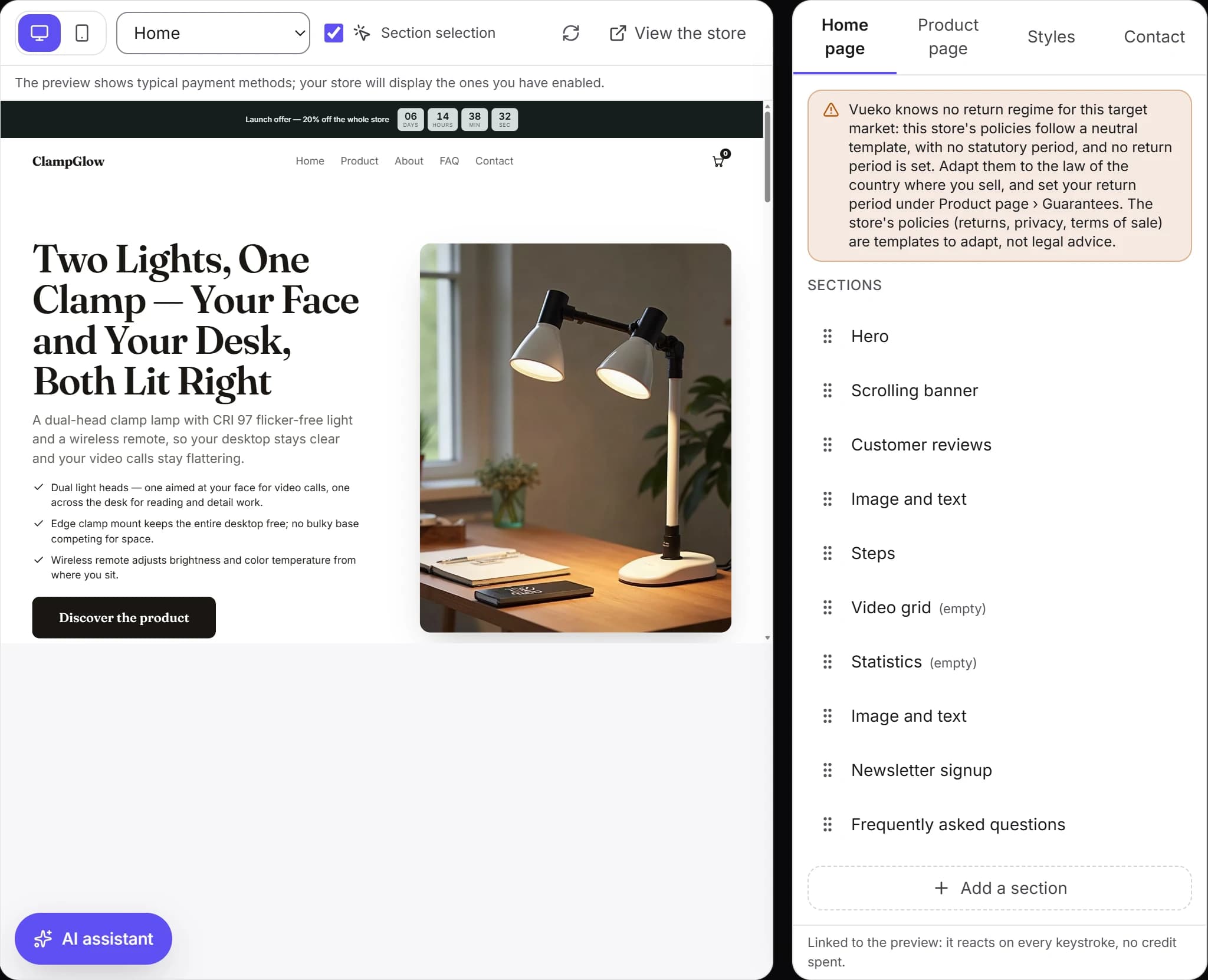
Home page, product page, copy, visuals, FAQ and policy pages: the whole store is created in one go, in about two minutes. Creation keeps going even if you leave the page.
You review and edit
In the editor, add, hide or reorder sections, change a text, a color or a photo. Typing costs nothing; the AI assistant, which edits the store from a single sentence, uses credits.
You send it to Shopify
With a paid plan, Vueko writes it into your Shopify account, with its theme unpublished, or you download it as a kit to import yourself.
A complete store, not a mockup
Every generation produces the whole store: the announcement banner, the home page sections in a set order, a product page with its visuals, its blocks and its packs, an FAQ, a Contact page, the policy pages and the launch offer countdown. It comes out entirely in its language, down to the texts the theme displays, with a draft ad campaign to refine in your ads manager.
The copy is written for your product, based on its features. If the link is a store's, it is only used to identify the product: its photos, its copy, its name, its logo and its reviews are never reused. Its price is a starting point and may stay the same as the store's: you set your own in the editor. To use a recognized supplier's photos, such as AliExpress, also paste the link to its product page in the optional “Supplier link” field: its photos go to the top of the product gallery; if none can be used, the store keeps its generated visuals.
Vueko makes up no proof. The review cards are generic examples, with no first name and no rating, to replace with your real reviews; no stars appear without a review source, and figures Vueko cannot know are left for you to fill in.
Policies and price follow your market
The target market, the European Union, the United Kingdom, Switzerland, Brazil, Mexico, the United States or another country on the list, decides the store's policy template and the currency of its price. For a country outside the list, the policies follow a neutral template, to adapt, and the price stays in the currency of the original page. Otherwise, the price is converted into the market's currency at the European Central Bank's reference rate, then rounded the way that currency is used, such as €29.90 for the euro. If the link is from a store Vueko does not know yet, its currency cannot always be read and the euro is assumed: check the price in the editor, where it can be fixed without spending any credit.
Delivery times, the return period and customer service are store settings: at generation, Vueko writes the copy with those values. If you change them later, the guarantees under the buy button follow; then review the scrolling banner, the steps and the policy pages, which keep the original values.
When Vueko writes the store into your Shopify account, it reads your store's language and currency and warns you if they do not match the generated store: it never changes them for you. With the kit, which you import yourself, check them in your Shopify store's settings.
Your logo in the same store
The free logo maker builds twelve proposals from your brand name. A logo chosen before generation gives the store its name and goes into its header; its downloadable files, in SVG and PNG, are included in the paid plans.
What the free plan allows, and what it does not
With the free plan, you generate your store with the free credits, you edit it and you see its preview. Delivery to Shopify and the kit download are reserved for the paid plans, through a monthly subscription with no commitment: a credit pack alone does not unlock them.
As soon as your workspace subscribes, the store generated on the free plan can be delivered as it is: nothing needs redoing. A generation that fails uses no credits: they are only deducted once the store is ready.
For direct delivery, you connect your store by creating an app in your Shopify account; an illustrated guide shows every screen. Vueko writes the theme into it, unpublished, along with the product, the pages and the navigation: you review, then you publish. The kit, for its part, is an archive with the theme and the product file, to import without connecting any account. Compare the plans that include delivery.
No product yet? Successful Shopify stores and their ads are a good starting point, and the traffic calculator tells you how many visitors you need for your revenue goal.
Generate your store
Create your account, paste a product link and see your store in preview, before choosing a plan to deliver it.