Find successful Shopify stores, then analyze them
A store that pays to be seen, and keeps paying week after week, is betting on what it sells. Vueko reads Meta's ad library, keeps the Shopify stores that invest there over time, and opens their store page for you: their products, their ads, their revenue and where their figures come from. The free plan opens the store page and its products; ads and revenue are included in the paid plans.
Free account, no credit card needed.
What “successful” means here
Vueko cannot see a store's orders: it looks at the store from the outside, like any visitor. What can be seen is what it publishes: its ads, how long they run, how many people they reach in Europe, its catalog. A store that keeps ads running week after week, and puts money behind them, is betting on what it sells: that is the signal Vueko relies on.
Our crawlers go through Meta's ad library and spot the Shopify stores that advertise. Each one is then judged on an estimate of its ad spend, recalculated every night: a store only enters the list if that spend reaches our threshold, and leaves it if the spend stays too low. What remains are active stores, revisited regularly.
It is a signal, not proof: a store can also advertise at a loss. That is why the store page says where its main figures come from, and what it does not know.
A Shopify store analysis tool, with nothing to install
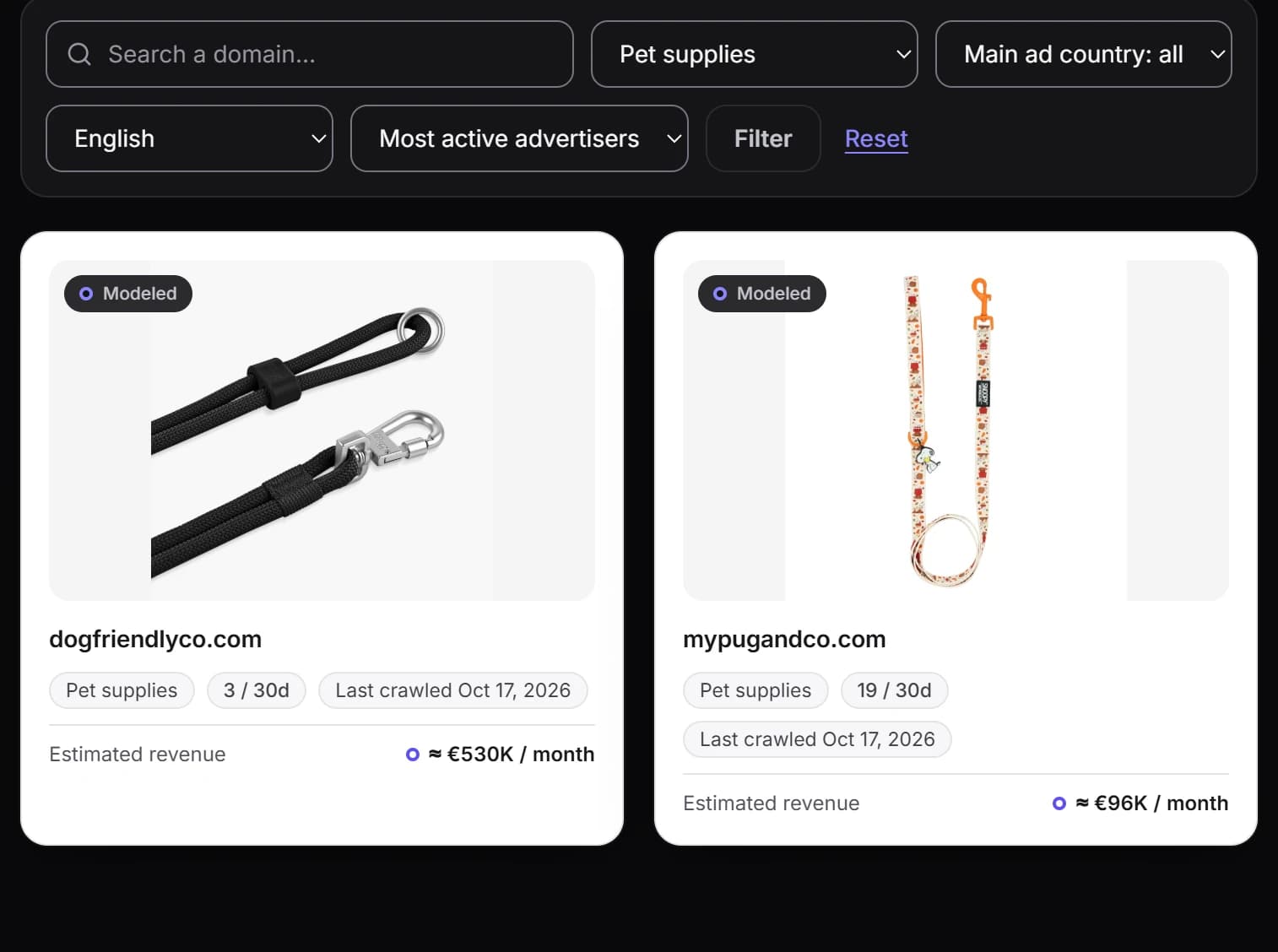
The list opens on the stores that are most active in advertising, according to our estimate. Filter it by niche, by main ad country or by store language, or search for a specific domain. Each card shows the store's domain, its niche, the photo of the product it features and how many products it has added or restocked in thirty days; on the paid plans, its revenue, reported or estimated, is added.
A store page brings together what Vueko knows about it: a capture of its home page, on desktop and on mobile, the reach of its ads in the European Union, the length of the longest one, and up to four of its products, starting with those its ads feature most. The paid plans add what its ads cost it per day at a minimum, according to our estimate, and the number of its active ads each week over twelve months, for the weeks in which we could count them all. Most products can be searched on Alibaba in one click, and a link opens the store itself so you can browse its full catalog.
Revenue comes in two kinds there, never mixed up. When the company that runs the store publishes its accounts, the page shows the reported revenue, its year and a link to the public register where you can check it: this applies to French stores whose legal notice gives their SIREN number, and whose company name appears in the domain name. Otherwise, Vueko estimates it from the store's visits coming from Google, which are themselves estimated, and shows it as an estimate, with a likely range and a wide range; for the largest stores, a minimum, with no range. Until those visits have been recorded, the page says the estimate is pending, never zero.
None of this is guesswork: our method for calculating ad spend and revenue is published, limits included.
What the store page shows, and where it comes from
On the store page, reach, spend and revenue show their source through their shape: a solid dot for a fact published by Meta or by the company, which anyone can check at its source; a hollow ring for a Vueko estimate, labeled as such.
- Published fact:
Ad reach in Europe
Published by Meta for every ad that ran in the European Union, and recorded by Vueko for the most seen: the number of people reached.
- Published fact:
Reported revenue
Published by the company in its accounts, with its year and a link to the public register.
- Vueko estimate:
Ad spend per day
Our estimate, drawn from the published reach: a minimum, never a recorded amount.
- Vueko estimate:
Estimated revenue
Our estimate, drawn from the visits the store gets from Google, which are estimated too, with two ranges; for the very largest stores, a minimum.
Analyze a Shopify competitor
Already know your competitors? Search for their domain. If their store is in our database, its page opens. Track it: it joins your tracked competitors, where you see its new products from the last thirty days and, with a paid plan, the number of its Meta ads active in Europe in the last complete week, the change from the week before and its revenue, reported when its company publishes it, estimated otherwise.
Vueko does not analyze a store on request: a store only enters its database if our crawlers find it in Meta's ad library and its estimated ad spend reaches our threshold. Only a store in that database can be tracked, and how many stores you can track depends on your plan: compare the plans and their tracked stores.
The weeks counted are complete weeks. The current week never is, and a week in which our list of the store's ads is incomplete is not counted: an empty box is better than a drop that never happened.
From the store page to your own store
A store can also be read through its ads: each ad can be viewed one by one, with its video or image, its text and how long it ran. For its Meta ads most seen in Europe, you also get their reach, published by Meta, and their estimated spend. The page see a competitor's Facebook and TikTok ads explains what Vueko shows about them, and what it does not know.
A store inspires you? On its page, the “Create my store in this style” button opens the generator prefilled with what Vueko knows about it: its niche, its language, its market and, when we could record them, its colors. It also suggests as a starting point the products the store features in its ads. The Shopify store generator then writes yours, with its own copy and its own visuals: it reuses neither the copy, nor the photos, nor the name, nor the logo, nor the reviews of the original store.
Start with the store list
The free plan gives limited access to the list and one tracked store. Revenue, ads and history on the store page are included in every paid plan; visits coming from Google are added from the Growth plan.